
In the UK, many cultural organisations receive funding from Arts Council England (ACE). To help justify this funding ACE would like to know a bit about the audiences that these cultural organisations attract. And this data is also useful for the organisation itself – it can help the organisation understand their audiences and show how audiences develop over time.
One way of doing this is via emailed surveys. Many theatres will send a survey invite out to people the day after they’ve seen something – and ask people to fill in some details about who they are, and what they thought about their experience.
To help with this ACE funds a surveying platform for organisations to use. Up until 2023 this was supplied by The Audience Agency, since then the contract has been given to PwC.
I felt that existing systems were constrained – I was certain I could do something better.
Challenges of third party platforms
Using the provided third party platforms presents some challenges:
- Branding – when someone clicks a link, it’s usually clear that they are not dealing with the cultural organisation directly
- Admin overhead – New surveys need to be created in the survey platform for each year/venue/production, and the correct email link needs to be updated in emails that go out to audiences
- Asking for extra data from the respondent – Someone receives an email saying “thank you for seeing SHOW on DATE, please fill in survey”. They click the link – and the survey platform asks “What did you see? Which day did you see it? What time did you see it?”. This leaves the respondent thinking “surely you know this – you sent me the email?”
- Lack of data accuracy/validation – This is linked to the above – we know they saw a show – that’s why we sent them an email. But we then ask them to fill in data about what they saw – and a percentage of respondents will make a mistake. Either selecting the wrong day or time, or sometimes even the wrong show. This reduces the reliability and effectiveness of the responses received.
- Lack of flexibility – as these platforms are designed for scale, they take a “one size fits all” approach. It is possible to add some extra questions, but these are usually from a limited fixed set, and incur extra costs. It’s also not possible to change how the questions are presented – venues can’t add in any explanatory text, or add any context to questions. And there’s no chance of inserting any extra information or cross-promotion.
Can it be improved?
There was a gap of a few months between the old platform becoming unavailable and the new one being ready – which presented me with an opportunity.
One of the phrases I work with is “Why is it like that? Can it be improved? Can I do anything to make it better?”.
I came up with a set of aims:
- Reduce admin overhead – it should be as close to self-running as possible
- Avoid asking people questions we already know the answer to
- Should have our branding, ideally being hosted on our own website
- Lead with a “soft” question in the email to encourage a click (such as NPS), and once someone clicks we can then encourage a “while you’re here, would you mind answering some more questions?”
And, some extra stretch goals:
- Multiple exit-points? So, half way through offer people the ability to submit what they’ve done so far if they don’t feel like doing the whole thing? We won’t get the whole survey – but we will get something
- Extra flexibility? Can we have one survey, but have ways of skipping questions/sections, or include extra questions, depending on who is filling it in?
- Enrich with extra data? Can we show context for the survey responses?
Yes – it can be improved!
In designing a PoC (Proof of Concept) I had something that was far beyond just being a PoC – it was about 90% there. With a bit of tweaking we had a platform that was not only workable – it was useful.
Initially I designed this system as a stop-gap – the old system provided by ACE had gone, and the new one was delayed. Since rolling this system out it has worked so well we continue to use it – and added further improvements – as it’s able to do things that third-party systems can’t do.
I was able to achieve all my initial aims, plus my stretch aims – and more.
How?
I use several platforms to put this all together:
- WordFly This pulls data from our CRM system (Tessitura), to send emails to bookers who saw last night’s show
- Jotform Enterprise This is the system that captures the survey responses – and is accessed via our own website
- Power Automate This saves survey response data into SharePoint, and augments it with data pulled directly from Tessitura
- PowerBI This shows dashboards of aggregated responses
The key thing that makes this all work is the first part with WordFly. When pulling data from Tessitura, it also pulls the performance ID – so the survey platform (and the automation) knows the specific performance.
With this new system there’s a lot that we can do.
Start with NPS – and give an early “out”
We can start the survey with a NetPromoter Score-type question:

Once someone has clicked the link in an email and got here they can just click “Submit” – but we have a second chance to ask them if they would be willing to help us further.
Multiple “outs”
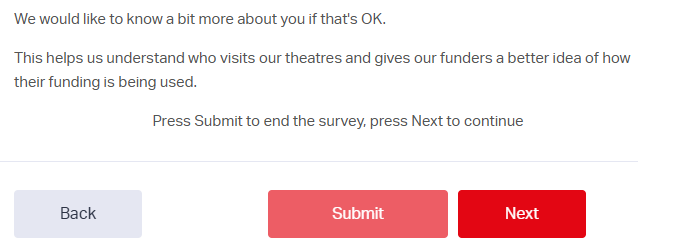
Ideally we’d want people to fill in the whole survey – that’s where we get the most value.
However, surveys can be long and dull – and often people will abandon half-way through.
Some info is better then none at all – so – let’s give them the option to at least send what they’ve already done:
Don’t ask what we already know
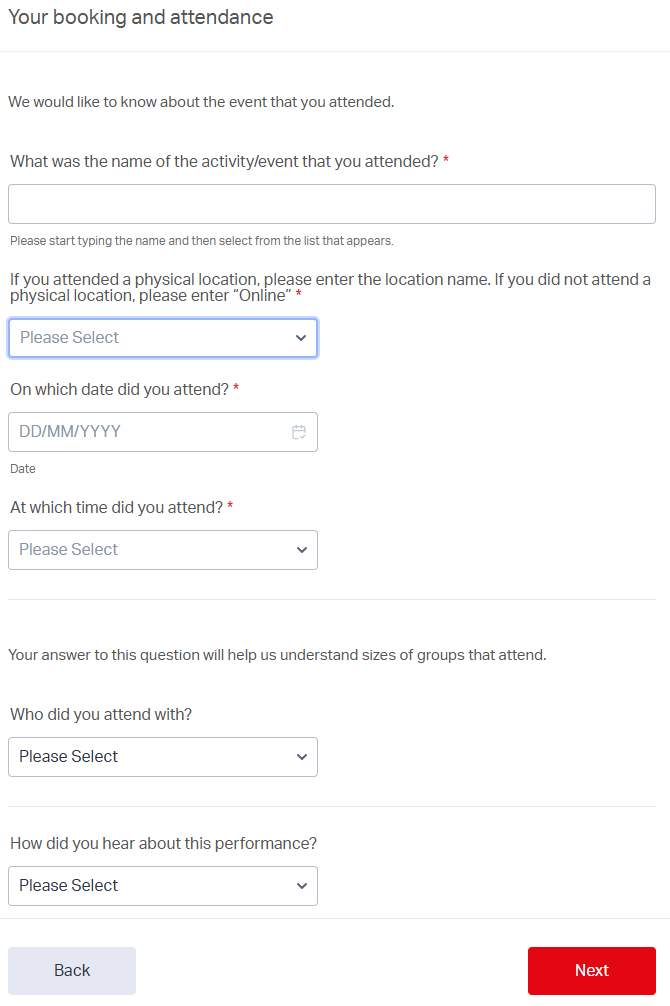
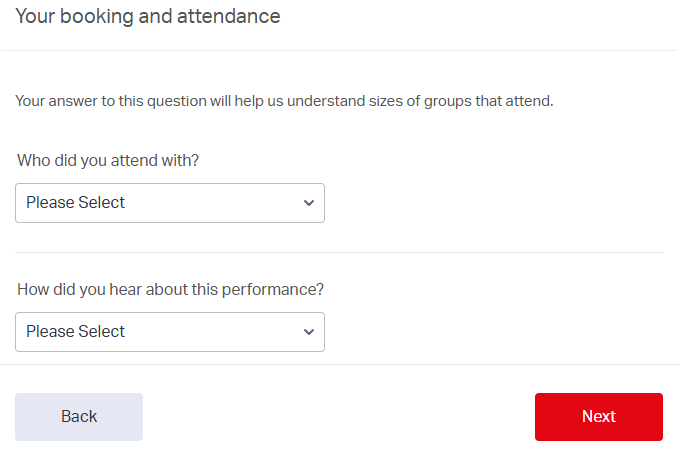
When someone clicks a survey link we no longer need to ask them details about what they saw.
So, instead of this:
They get this:
Different surveys for different uses
We can create different links to the survey to skip questions for particular respondents – or even whole sections.
We can have a standard survey link that asks both demographic and qualitative questions, and different links that will only ask demographic.
Or, we can have a version of the survey intended to be asked in-person (“clipboard” surveys), that ask extra questions that are more suited to in-person interviews.
Show extra info
If someone indicates that they are D/deaf or D/disabled, we can ask if they are aware of the Access for All Scheme that we run:

Context for data – response rates
With third-party systems they will often show you a “response rate” – but this is the rate for people who received the email – not people who saw the show.
We aren’t able to email anyone who books via an agent, or who are part of a group booking – so any shows that have a sizeable chunk of either types of bookings will have a skewed response rate when using third-party platforms.
With this system, we know the exact performance – so we can pull numbers of people that were in the auditorium – and give a response rate relative to that.
So when we talk about “8% response rate” – that’s 8% of our audience – not 8% of bookers:

Context for data – census data
When we present this data – we can add context by using the 2021 census.
For example, here is the aggregated age range, overlaid with a line showing age groups for London:
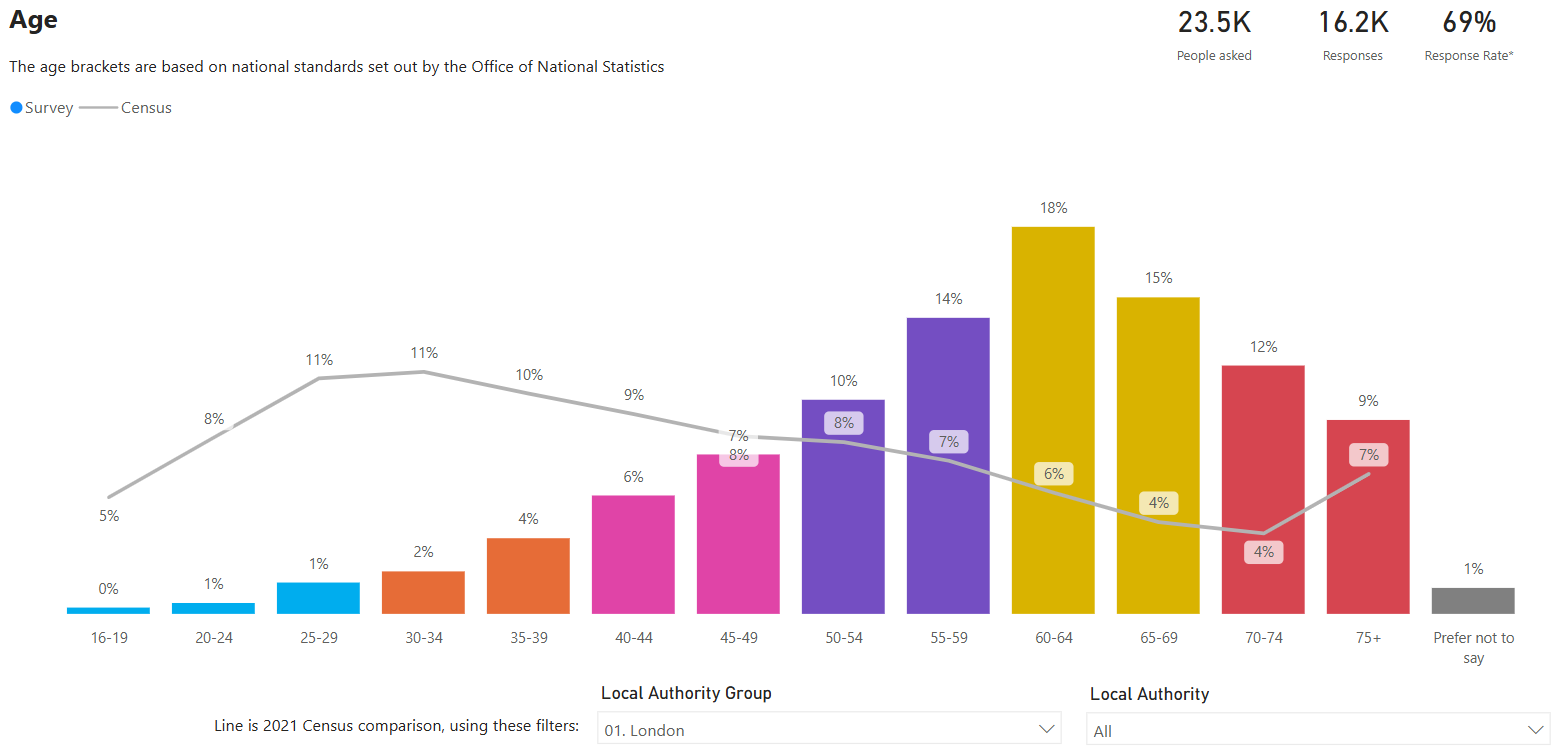
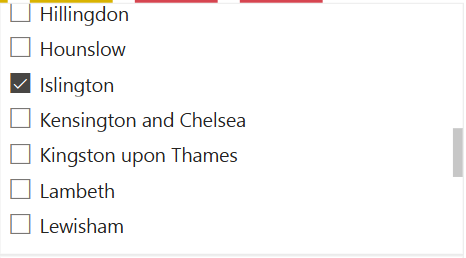
And the census data can be filtered in several ways:
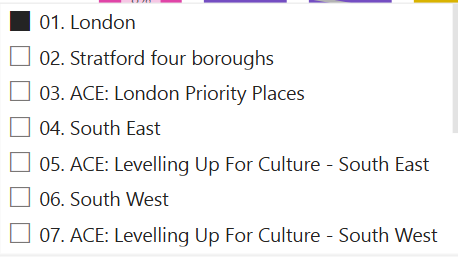
Even down to specific local authority:
All this and so much more…
These are just some of the things that this system can do – but there’s more:
- Export data to either the Illuminate platform, or partners
- Extra questions about our new venue, our video-on-demand platform, etc
- Extra questions if they attended an assisted performance (audio described, BSL, etc)
- Upsell our young person’s ticket scheme
- Filter responses in multiple ways – by venue or production, by time or date of performance, by date of survey response, by “source” of the survey link sent, by artistic programme of performance, etc
…with future potential
Not only can this approach do all of the above, but there’s potential for it to do even more.
We could ask extra questions to people who have a membership – or to upsell memberships to people who don’t.
We could change the survey questions if someone has recently filled one in – or potentially suppress sending them a survey invite in the first place.
We could incentivise responses – offering entry into a prize draw as a thank-you.
And probably other things I haven’t yet thought about!
Do you want this for your organisation?
Do let me know if you’d like to know more about this platform and how it works – I could even build something similar for your organisation.
Connect with me on LinkedIn to have a chat.
 Matt Kirby
Leave a comment