Category: Sys Admin
-
Transforming Collaboration During COVID-19
A blast from the past this one! During 2019 we stated rolling out Office 365 – putting Teams front-and-center. By the start of 2020 the roll-out was largely complete – but training wasn’t fully ramped up and staff were still getting to grips with things. Then COIVD hit, and office staff all suddenly had to…
Written by

-
Automate Contract Generation with SharePoint and Adobe Sign
I have previously written a couple of blog posts (1, 2) about elements of this system – but haven’t done an overview – so here it is! We issue data sharing contracts with third parties – sometimes several a month. The basics of these contracts are exactly the same with only a few details needing…
Written by

-
Improving Audience Surveys for Cultural Organisations
In the UK, many cultural organisations receive funding from Arts Council England (ACE). To help justify this funding ACE would like to know a bit about the audiences that these cultural organisations attract. And this data is also useful for the organisation itself – it can help the organisation understand their audiences and show how…
Written by

-
Remote Desktop web client errors after TLS/SSL certificate update – how to fix
We make heavy use of Remote Desktop web and the HTML 5 client. However – whenever the TLS/SSL certificate is updated, we used to get service desk calls saying people can’t login, with the error “Your session ended because an unexpected server authentication certificate was received from the remote PC”: The usual “fix” offered is…
Written by

-
Hide Automate Button in SharePoint List CommandBar with JSON
A while ago I was playing with a Sharepoint list for generating data sharing contracts, and added a context-sensitive button in a column to trigger a flow. This would send the data to AdobeSign to fill into a template, and set off a signing process. Since then I’ve found a whole collection of JSON snippets…
Written by

-
Enhance SharePoint Lists with JSON Snippets for Advanced Formatting
This will be less of a blog post – and more of a place for me to save a useful resource so I can find it again: https://github.com/pnp/List-Formatting This is a collection of JSON snippets to add enhanced formatting for SharePoint lists. Why? Let me give you an example. Currently I’m moving our cyber risk…
Written by

-
CrowdStrike – there but for the grace…
I’m writing this a few days after the global IT outage that pulled TV stations off the air, grounded planes, and made it tricky to purchase your morning coffee. And more seriously prevented 911 calls from working in Alaska. Where I work was largely unaffected. Our servers kept running, payments kept being processed, and staff…
Written by

-
Power Automate and the missing headers
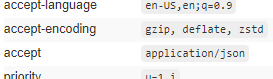
I’ve been using Power Automate with a Custom Connector to our on-prem CRM to do various automation things. We recently ran a CRM update – which necessitated creating a new Power Automate custom connector as the API definition changed. Our CRM does provide a Swagger file – but it’s too large for Power Automate (around…
Written by
-
Disable “stale” user accounts for Office 365 and on-prem hybrid
We recently had a cyber audit at work – and one of the recommendations was to ensure that any user accounts not used within 90 days were disabled. Prior to us moving to Office 365 hybrid we did have an on-prem tool that would do this for us, checking on-prem domain controllers for last login…
Written by

-
SQL backup to Azure URL Blob: “Operating system error 50(The request is not supported.)”
I wanted to setup an on-premises SQL server to backup directly to Azure Blob storage, using Microsoft’s walk-through: https://learn.microsoft.com/en-us/sql/relational-databases/tutorial-use-azure-blob-storage-service-with-sql-server-2016?view=sql-server-ver16. However, there is a mistake in the provided Powershell script – so things won’t work as expected. TLDR; Script truncates Shared Access Signature – add “s” at start of SECRET The script on the above page…
Written by

 Matt Kirby